How do I move a site to a new computer?
At times a QCS user may wish to move all of the QCS data from one computer to another. An example of such a situation is when a new computer has been purchased and the user wishes to run QCS on the new computer.
To move all of the data from a QCS Site, including its site ID, from one computer to another you will need to perform the following:
1.On your new computer install QCS by running the QCS Setup program. Make sure that you select to install the "Stand Alone" version of QCS.
2.On your old computer locate the QCS database
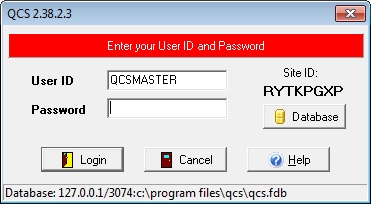
1.Start QCS.
2.At the Login screen click on the [Database
3.Towards the bottom of the Database Location window you will find the path and name of the QCS database file. For a default installation the path will be C:\Program Files\QCS and the name of the database file will be QCS.FDB
3.You will also need to locate the QCS database file on your new computer. Use the same steps used above to locate the QCS database file on your old computer to find it on your new computer. Recall that since QCS has just been installed on your new computer that the database file will not contain any data.
4.Overwrite the QCS database file on your new computer with the database file on your old computer.
5.Start QCS on your new computer. When the Login window appears you should see the same site ID that is also on your old computer. Continue logging into QCS by entering your user name and password. It is important to note here that Contractor Staff information is not copied from the old computer to the new computer so you should use the default user name and password of QCSMASTER and masterkey.
6.Finally if you have setup users and logins other than the default, those can be brought over as well. Copy the C:\Program Files\Firebird\Firebird_USACE
When you open QCS on your new computer all of your data will now be available to you. Since your new computer has the same site ID as your old computer you will need to delete the QCS database file on your old computer. This is very important since both computers have the same site ID and exports from the two computers will conflict with each other and corrupt the data in your contract. (The QCS Site ID is embedded within the QCS database - that is why the same Site ID can be retained)